Claude Codeでは、より深く推論させたい場合に、ultrathinkと打つことで深く考えさせることができる。
やり方は簡単でプロンプトに ultrathink 書いて、その後にプロンプトを書けばいいだけ。
CludeのProプランの制限について調べてみました。
というのも最近Proプランに課金しているのですが、そもそもどれくらい使えるのかがよくわかっていないので調べてみた。
セッションごとの上限:
混雑する時間帯でも、Proは無料版の少なくとも5倍の量を1セッションで使えます。
週ごとの上限:
全モデル共通の週単位の上限もあり、アカウントごとに決まった時刻に毎週リセットされる。
上限はClaude(チャット)とClaude Codeの両方で共通です。
Webかデスクトップアプリの「設定 > 使用状況(Settings > Usage)」を開くと、5時間のセッション上限、週の上限、モデル別の週上限がある場合はそれも、それぞれリセット時刻と一緒に表示されます。
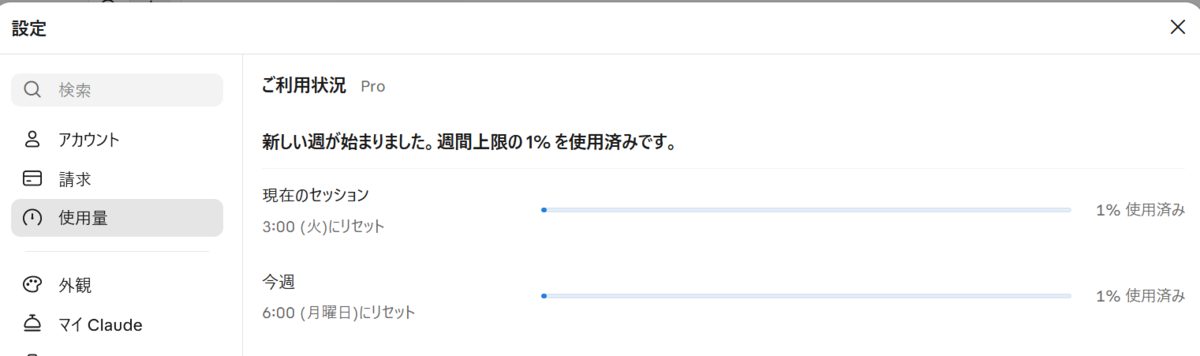
会話の長さの上限(コンテキスト):
利用量の上限とは別に、1つの会話にも長さの上限があります。
有料プランでは最新モデルで最大100万トークン、その他のモデルでは50万または20万トークンです。
API:
ProプランにはClaude ConsoleでのAPI利用は含まれず
Excelの数式をAIに作らせるためのプロンプトジェネレーターを作ってみた。
Excel内のAIでできたらいいけど、できない人もいると思うので。
こういうのがあればいいかなと思い作ってみた。
index.html
<!DOCTYPE html>
<html lang="ja">
<head>
  <meta charset="UTF-8">
  <meta name="viewport" content="width=device-width, initial-scale=1">
  <title>Excel数式プロンプトジェネレーター</title>
  <link rel="stylesheet" href="style.css">
</head>
<body>
  <header class="app-header">
    <div class="brand">
      <span class="logo">fx</span>
      <div>
        <h1>Excel数式プロンプトジェネレーター</h1>
        <p>「元データ」と「期待する結果」を入力するだけで、AIに数式を作ってもらうためのプロンプトを自動生成します。</p>
      </div>
    </div>
    <div class="header-actions">
      <button type="button" id="btn-sample" class="btn">サンプルを読み込む</button>
      <button type="button" id="btn-reset" class="btn btn-ghost">すべてリセット</button>
    </div>
  </header>

  <div class="layout">
    <main class="main">
      <!-- STEP 1 -->
      <section class="card">
        <h2><span class="step">1</span>Excelの環境</h2>
        <div class="controls">
          <label class="field">
            <span>Excelのバージョン</span>
            <select id="version"></select>
          </label>
        </div>
        <div id="version-info" class="version-info"></div>
      </section>

      <!-- STEP 2 -->
      <section class="card">
        <h2><span class="step">2</span>元データと期待する結果</h2>
        <p class="hint">
          セルをクリックして入力します。Excelでコピーした範囲をそのまま貼り付け(Ctrl+V)できます。
          <kbd>Enter</kbd> で下へ、矢印キーで移動。列番号・行番号は「開始セル」に合わせて自動で変わります。
          元データと同じシートの場合、「期待する結果」には元データの値が<span class="ref-legend">グレー</span>で表示されます(編集不可)。
        </p>

        <div class="grids">
          <!-- 元データ -->
          <div class="grid-panel" id="panel-input">
            <div class="panel-head">
              <h3><span class="dot dot-input"></span>元データ</h3>
              <span class="range-badge" data-role="range"></span>
            </div>
            <div class="controls">
              <label class="field w-sheet"><span>シート名</span><input data-field="sheet" type="text" autocomplete="off"></label>
              <label class="field w-xs"><span>開始セル</span><input data-field="start" type="text" autocomplete="off"></label>
            </div>
            <div class="controls">
              <label class="check"><input data-field="header" type="checkbox">1行目は見出し</label>
              <label class="field w-sheet"><span>テーブル名(任意)</span><input data-field="tableName" type="text" placeholder="例: 売上表" autocomplete="off"></label>
              <button type="button" class="btn btn-small btn-ghost push-right" data-action="clear">クリア</button>
            </div>
            <div class="grid-wrap"><table class="grid" data-role="grid"></table></div>
            <div class="grid-actions">
              <button type="button" class="btn btn-small" data-action="add-row">+ 行を追加</button>
              <button type="button" class="btn btn-small" data-action="add-col">+ 列を追加</button>
            </div>
          </div>

          <div class="grid-arrow" aria-hidden="true">
            <span>数式</span>
            <svg viewBox="0 0 24 24" width="28" height="28"><path d="M4 12h14m-5-6 6 6-6 6" fill="none" stroke="currentColor" stroke-width="2.2" stroke-linecap="round" stroke-linejoin="round"/></svg>
          </div>

          <!-- 期待する結果 -->
          <div class="grid-panel" id="panel-output">
            <div class="panel-head">
              <h3><span class="dot dot-output"></span>期待する結果</h3>
              <span class="range-badge" data-role="range"></span>
            </div>
            <div class="controls">
              <label class="field w-sheet"><span>シート名</span><input data-field="sheet" type="text" autocomplete="off"></label>
              <label class="field w-xs"><span>開始セル</span><input data-field="start" type="text" autocomplete="off" placeholder="自動" title="同じシートなら元データのすぐ右に自動で合わせます。手入力すると固定、空欄にすると自動に戻ります。"></label>
            </div>
            <div class="controls">
              <label class="check"><input data-field="header" type="checkbox">1行目は見出し(手入力)</label>
              <label class="field w-sheet">
                <span>空欄のセルは</span>
                <select data-field="emptyMode">
                  <option value="blank">空白になるべき</option>
                  <option value="ignore">結果を問わない</option>
                </select>
              </label>
              <button type="button" class="btn btn-small btn-ghost push-right" data-action="clear">クリア</button>
            </div>
            <div class="grid-wrap"><table class="grid grid-output" data-role="grid"></table></div>
            <div class="grid-actions">
              <button type="button" class="btn btn-small" data-action="add-row">+ 行を追加</button>
              <button type="button" class="btn btn-small" data-action="add-col">+ 列を追加</button>
            </div>
          </div>
        </div>

        <div id="grid-warnings" class="warnings"></div>
      </section>

      <!-- STEP 3 -->
      <section class="card">
        <h2><span class="step">3</span>やりたいこと・条件</h2>
        <label class="field block">
          <span>やりたいこと(任意・書くほど精度が上がります)</span>
          <textarea id="task" rows="3" placeholder="例: 担当者ごとに売上の合計と件数を集計したい。担当者は元データに出てくる順で重複なく並べたい。"></textarea>
        </label>

        <div class="sub-title">数式の形</div>
        <div class="radio-group" id="style-group">
          <label class="radio"><input type="radio" name="style" value="auto"><span>おまかせ</span></label>
          <label class="radio"><input type="radio" name="style" value="spill"><span>1つの数式でスピル(動的配列)</span></label>
          <label class="radio"><input type="radio" name="style" value="fill"><span>先頭セルに入れて下・右へコピー</span></label>
        </div>

        <div class="sub-title">条件</div>
        <div class="check-grid" id="options"></div>

        <label class="field block">
          <span>その他の条件・補足(任意)</span>
          <textarea id="extra" rows="2" placeholder="例: 日付は文字列ではなくシリアル値です。0円の行は除外してください。"></textarea>
        </label>
      </section>
    </main>

    <!-- STEP 4 -->
    <aside class="side">
      <section class="card prompt-card">
        <div class="prompt-head">
          <h2><span class="step">4</span>生成されたプロンプト</h2>
          <span id="char-count" class="muted"></span>
        </div>
        <textarea id="prompt" readonly spellcheck="false"></textarea>
        <button type="button" id="btn-copy" class="btn btn-primary btn-block">プロンプトをコピー</button>
        <p class="hint small">コピーしてChatGPT・Claude・Copilotなどに貼り付けてください。</p>
      </section>
    </aside>
  </div>

  <div id="toast" class="toast" role="status" aria-live="polite"></div>

  <script src="app.js"></script>
</body>
</html>
style.css
:root {
  --bg: #f4f6f5;
  --surface: #ffffff;
  --text: #1f2a24;
  --muted: #66746c;
  --border: #dde3df;
  --accent: #217346;
  --accent-strong: #185c37;
  --accent-soft: #e6f2eb;
  --output: #2b6cb0;
  --output-soft: #e8f0fa;
  --grid-line: #e2e5e3;
  --grid-head: #f1f3f2;
  --warn-bg: #fff7e0;
  --warn-text: #7a5a00;
  --radius: 10px;
  --shadow: 0 1px 2px rgba(0, 0, 0, .05), 0 4px 14px rgba(0, 0, 0, .04);
  --mono: "Cascadia Mono", Consolas, "BIZ UDGothic", monospace;
}

* { box-sizing: border-box; }

html, body { margin: 0; }

body {
  background: var(--bg);
  color: var(--text);
  font-family: "Segoe UI", "Yu Gothic UI", "Hiragino Sans", "Meiryo", sans-serif;
  font-size: 14px;
  line-height: 1.55;
}

button, input, select, textarea { font: inherit; color: inherit; }

/* ---------- Header ---------- */
.app-header {
  display: flex;
  align-items: center;
  justify-content: space-between;
  gap: 16px;
  flex-wrap: wrap;
  padding: 16px 24px;
  background: var(--surface);
  border-bottom: 1px solid var(--border);
}
.brand { display: flex; align-items: center; gap: 14px; min-width: 0; }
.brand h1 { margin: 0; font-size: 19px; letter-spacing: .01em; }
.brand p { margin: 2px 0 0; color: var(--muted); font-size: 13px; }
.logo {
  flex: none;
  display: grid;
  place-items: center;
  width: 40px;
  height: 40px;
  border-radius: 9px;
  background: var(--accent);
  color: #fff;
  font-style: italic;
  font-weight: 700;
  font-family: Georgia, serif;
  font-size: 18px;
}
.header-actions { display: flex; gap: 8px; }

/* ---------- Layout ---------- */
.layout {
  display: grid;
  grid-template-columns: minmax(0, 1fr);
  gap: 18px;
  padding: 18px 24px 40px;
  max-width: 1760px;
  margin: 0 auto;
}
.main { display: flex; flex-direction: column; gap: 18px; min-width: 0; }

@media (min-width: 1360px) {
  .layout { grid-template-columns: minmax(0, 1fr) 440px; align-items: start; }
  .side { position: sticky; top: 18px; }
  .prompt-card textarea { height: calc(100vh - 210px); }
}

.card {
  background: var(--surface);
  border: 1px solid var(--border);
  border-radius: var(--radius);
  box-shadow: var(--shadow);
  padding: 18px 20px;
  min-width: 0;
}
.card h2 {
  display: flex;
  align-items: center;
  gap: 10px;
  margin: 0 0 14px;
  font-size: 16px;
}
.step {
  display: inline-grid;
  place-items: center;
  width: 24px;
  height: 24px;
  border-radius: 50%;
  background: var(--accent);
  color: #fff;
  font-size: 13px;
  font-weight: 700;
}
.hint { margin: -4px 0 14px; color: var(--muted); font-size: 13px; }
.hint.small { margin: 10px 0 0; font-size: 12px; }
.muted { color: var(--muted); font-size: 12px; }
kbd {
  padding: 0 5px;
  border: 1px solid var(--border);
  border-bottom-width: 2px;
  border-radius: 4px;
  background: var(--grid-head);
  font-family: var(--mono);
  font-size: 11px;
}

/* ---------- Form controls ---------- */
.controls {
  display: flex;
  flex-wrap: wrap;
  align-items: flex-end;
  gap: 10px 12px;
  margin-bottom: 10px;
}
.field { display: flex; flex-direction: column; gap: 4px; min-width: 0; }
.field > span { font-size: 12px; color: var(--muted); font-weight: 600; }
.field.block { margin-bottom: 14px; }
.w-xs { width: 74px; }
.w-sheet { width: 150px; }
.push-right { margin-left: auto; }

input[type="text"], input[type="number"], select, textarea {
  width: 100%;
  padding: 7px 9px;
  border: 1px solid var(--border);
  border-radius: 7px;
  background: #fff;
  outline: none;
  transition: border-color .15s, box-shadow .15s;
}
input[type="text"]:focus, input[type="number"]:focus, select:focus, textarea:focus {
  border-color: var(--accent);
  box-shadow: 0 0 0 3px rgba(33, 115, 70, .15);
}
input.invalid { border-color: #c53030; background: #fff5f5; }
#version { min-width: 280px; }
textarea { resize: vertical; line-height: 1.6; }

.check, .radio {
  display: inline-flex;
  align-items: center;
  gap: 7px;
  cursor: pointer;
  user-select: none;
  padding: 6px 0;
}
.check input, .radio input { accent-color: var(--accent); width: 16px; height: 16px; margin: 0; }

.sub-title { margin: 4px 0 6px; font-size: 12px; font-weight: 600; color: var(--muted); }
.radio-group { display: flex; flex-wrap: wrap; gap: 8px; margin-bottom: 14px; }
.radio {
  padding: 6px 12px;
  border: 1px solid var(--border);
  border-radius: 999px;
  background: #fff;
}
.radio:has(input:checked) { border-color: var(--accent); background: var(--accent-soft); color: var(--accent-strong); font-weight: 600; }
.radio:has(input:disabled) { opacity: .5; cursor: not-allowed; }
.check-grid {
  display: grid;
  grid-template-columns: repeat(auto-fill, minmax(280px, 1fr));
  gap: 0 18px;
  margin-bottom: 14px;
}

/* ---------- Buttons ---------- */
.btn {
  display: inline-flex;
  align-items: center;
  justify-content: center;
  gap: 6px;
  padding: 7px 14px;
  border: 1px solid var(--border);
  border-radius: 7px;
  background: #fff;
  cursor: pointer;
  font-weight: 600;
  transition: background .15s, border-color .15s;
}
.btn:hover { background: var(--grid-head); }
.btn-ghost { background: transparent; }
.btn-small { padding: 5px 10px; font-size: 12px; }
.btn-primary { background: var(--accent); border-color: var(--accent); color: #fff; }
.btn-primary:hover { background: var(--accent-strong); }
.btn-block { width: 100%; padding: 11px; font-size: 15px; margin-top: 12px; }

/* ---------- Version info ---------- */
.version-info { margin-top: 12px; display: grid; gap: 6px; }
.feature {
  display: grid;
  grid-template-columns: 22px 170px 1fr;
  align-items: baseline;
  gap: 6px;
  font-size: 12.5px;
}
.feature .mark { font-weight: 700; }
.feature.ok .mark { color: var(--accent); }
.feature.ng { color: #9aa49e; }
.feature.ng .funcs { text-decoration: line-through; }
.feature .name { font-weight: 600; }
.feature .funcs { font-family: var(--mono); font-size: 12px; word-break: break-word; }

/* ---------- Grids ---------- */
.grids {
  display: grid;
  grid-template-columns: minmax(0, 1fr) auto minmax(0, 1fr);
  gap: 14px;
  align-items: stretch;
}
.grid-panel {
  border: 1px solid var(--border);
  border-radius: var(--radius);
  padding: 12px;
  min-width: 0;
  display: flex;
  flex-direction: column;
}
#panel-input { border-top: 3px solid var(--accent); }
#panel-output { border-top: 3px solid var(--output); }
.panel-head { display: flex; align-items: center; justify-content: space-between; gap: 8px; margin-bottom: 10px; }
.panel-head h3 { margin: 0; font-size: 15px; display: flex; align-items: center; gap: 8px; }
.dot { width: 10px; height: 10px; border-radius: 50%; }
.dot-input { background: var(--accent); }
.dot-output { background: var(--output); }
.range-badge {
  font-family: var(--mono);
  font-size: 12px;
  padding: 2px 8px;
  border-radius: 999px;
  background: var(--grid-head);
  color: var(--muted);
  white-space: nowrap;
  overflow: hidden;
  text-overflow: ellipsis;
  max-width: 60%;
}
.grid-arrow {
  display: flex;
  flex-direction: column;
  align-items: center;
  justify-content: center;
  gap: 2px;
  color: var(--muted);
  font-size: 11px;
  font-weight: 700;
}

.grid-wrap {
  flex: 1;
  overflow: auto;
  max-height: 460px;
  min-height: 160px;
  border: 1px solid var(--border);
  border-radius: 6px;
  background: #fff;
}
.grid {
  border-collapse: separate;
  border-spacing: 0;
  font-size: 13px;
}
.grid th {
  position: sticky;
  top: 0;
  z-index: 2;
  background: var(--grid-head);
  color: var(--muted);
  font-weight: 500;
  font-size: 12px;
  padding: 3px 6px;
  border-right: 1px solid var(--grid-line);
  border-bottom: 1px solid var(--grid-line);
  text-align: center;
  min-width: 40px;
}
.grid tbody th { position: sticky; left: 0; z-index: 1; top: auto; }
.grid thead th.corner { left: 0; z-index: 3; }
.grid td {
  padding: 0;
  border-right: 1px solid var(--grid-line);
  border-bottom: 1px solid var(--grid-line);
}
.grid input.cell, .grid input.ref {
  display: block;
  width: 116px;
  padding: 5px 7px;
  border: none;
  background: transparent;
  outline: none;
  font-size: 13px;
}
.grid input.cell:focus {
  background: #fff;
  box-shadow: inset 0 0 0 2px var(--accent);
}
.grid-output input.cell:focus { box-shadow: inset 0 0 0 2px var(--output); }
.grid td.own.is-header { background: var(--accent-soft); }
.grid td.is-header input { font-weight: 700; }
.grid-output td.own { background: #fbfdff; }
.grid-output td.own.is-header { background: var(--output-soft); }
/* 期待する結果グリッド内の元データ(参照のみ・編集不可) */
.grid td.ref { background: #e9ecea; }
.grid td.ref.is-header { background: #dfe3e0; }
.grid input.ref { color: #858f89; cursor: not-allowed; user-select: none; }
.grid td.gap { background: #f6f7f6; }
.grid th.active { background: #d8e6dd; color: var(--accent-strong); font-weight: 700; }
.grid-output th.active { background: #d5e3f3; color: var(--output); }

.grid-actions { display: flex; gap: 8px; margin-top: 8px; }

.ref-legend { padding: 0 5px; border-radius: 4px; background: #e9ecea; color: #858f89; }

.warnings { display: grid; gap: 6px; margin-top: 12px; }
.warnings:empty { display: none; }
.warning {
  padding: 8px 12px;
  border-radius: 7px;
  background: var(--warn-bg);
  color: var(--warn-text);
  font-size: 13px;
}

/* ---------- Prompt ---------- */
.prompt-head { display: flex; align-items: baseline; justify-content: space-between; gap: 8px; }
.prompt-head h2 { margin-bottom: 12px; }
#prompt {
  height: 520px;
  min-height: 260px;
  font-family: var(--mono);
  font-size: 12.5px;
  line-height: 1.6;
  background: #fafbfa;
  white-space: pre;
  overflow: auto;
}

/* ---------- Toast ---------- */
.toast {
  position: fixed;
  left: 50%;
  bottom: 28px;
  transform: translate(-50%, 20px);
  padding: 10px 18px;
  border-radius: 8px;
  background: #1f2a24;
  color: #fff;
  font-weight: 600;
  opacity: 0;
  pointer-events: none;
  transition: opacity .2s, transform .2s;
}
.toast.show { opacity: 1; transform: translate(-50%, 0); }

/* ---------- Responsive ---------- */
@media (max-width: 960px) {
  .grids { grid-template-columns: minmax(0, 1fr); }
  .grid-arrow { flex-direction: row; transform: none; }
  .grid-arrow svg { transform: rotate(90deg); }
}
@media (max-width: 640px) {
  .app-header { padding: 14px 16px; }
  .layout { padding: 14px 16px 32px; }
  .card { padding: 14px; }
  .feature { grid-template-columns: 22px 1fr; }
  .feature .funcs { grid-column: 2; }
  #version { min-width: 0; }
}
app.js
(() => {
'use strict';
const STORAGE_KEY = 'excel-formula-prompt-generator:v1';
const MAX_ROWS = 200;
const MAX_COLS = 52;
// ---------------------------------------------------------------------------
// Excelバージョンと関数の対応
// ---------------------------------------------------------------------------
const VERSIONS = [
{ id: '365', label: 'Microsoft 365(最新 / Excel for the web)', level: 7 },
{ id: '2024', label: 'Excel 2024', level: 6 },
{ id: '2021', label: 'Excel 2021', level: 5 },
{ id: '2019', label: 'Excel 2019', level: 4 },
{ id: '2016', label: 'Excel 2016', level: 3 },
{ id: '2013', label: 'Excel 2013', level: 2 },
{ id: '2010', label: 'Excel 2010 以前', level: 1 },
];
const DYNAMIC_ARRAY_LEVEL = 5;
const FEATURES = [
{ level: 2, name: 'Excel 2013 で追加', funcs: ['IFNA', 'XOR', 'FORMULATEXT', 'SHEET', 'DAYS', 'ISOWEEKNUM', 'NUMBERVALUE'] },
{ level: 4, name: 'Excel 2019 で追加', funcs: ['IFS', 'SWITCH', 'MAXIFS', 'MINIFS', 'CONCAT', 'TEXTJOIN'] },
{ level: 5, name: '動的配列(スピル)', funcs: ['FILTER', 'SORT', 'SORTBY', 'UNIQUE', 'SEQUENCE', 'RANDARRAY', 'XLOOKUP', 'XMATCH', 'LET'] },
{ level: 6, name: 'LAMBDA・配列操作', funcs: ['LAMBDA', 'MAP', 'REDUCE', 'SCAN', 'BYROW', 'BYCOL', 'MAKEARRAY', 'TEXTSPLIT', 'TEXTBEFORE', 'TEXTAFTER', 'VSTACK', 'HSTACK', 'TAKE', 'DROP', 'CHOOSECOLS', 'CHOOSEROWS', 'TOCOL', 'TOROW', 'WRAPROWS', 'WRAPCOLS', 'EXPAND', 'IMAGE'] },
{ level: 7, name: 'Microsoft 365 限定', funcs: ['GROUPBY', 'PIVOTBY', 'PERCENTOF', 'REGEXTEST', 'REGEXEXTRACT', 'REGEXREPLACE', 'TRIMRANGE'] },
];
// 条件チェックボックス(section: 'cond' は「条件」、'answer' は「回答形式」に出力)
const OPTIONS = [
{ id: 'noVba', def: true, section: 'cond', label: 'VBA・マクロは使わない(数式のみ)', text: 'VBA・マクロは使わず、ワークシート関数の数式だけで実現してください。' },
{ id: 'noHelper', def: true, section: 'cond', label: '作業列(補助列)を使わない', text: '作業列(補助列)は使わず、「期待する結果」の範囲内だけで完結させてください。' },
{ id: 'growable', def: true, section: 'cond', label: '元データの行が増えても対応できるようにする', text: '元データの行が今後増えても、数式を修正せずに対応できるようにしてください。' },
{ id: 'simple', def: true, section: 'cond', label: 'できるだけシンプルで読みやすい数式にする', text: 'できるだけシンプルで、後から読んでも理解しやすい数式にしてください。' },
{ id: 'noArrayFormula', def: true, section: 'cond', label: '配列数式(Ctrl+Shift+Enter で確定)を使わない', text: 'Ctrl+Shift+Enter で確定する配列数式({=...} の形になるCSE数式)は使わず、通常の Enter で確定できる数式にしてください。' },
{ id: 'noVolatile', def: false, section: 'cond', label: '揮発性関数(INDIRECT・OFFSET 等)を避ける', text: 'INDIRECT・OFFSET・TODAY・NOW などの揮発性関数はできるだけ避けてください。' },
{ id: 'errorBlank', def: false, section: 'cond', label: 'エラー・該当なしの場合は空白を表示', text: 'エラーや該当データなしの場合は、エラー値ではなく空白("")を表示してください。' },
{ id: 'explain', def: true, section: 'answer', label: '数式の解説を付けてもらう', text: '数式の仕組みを、使っている関数ごとに簡潔に解説してください。' },
{ id: 'alternatives', def: false, section: 'answer', label: '別解も提示してもらう', text: '可能であれば別のアプローチの数式も1つ提示し、違い(メリット・デメリット)を説明してください。' },
];
// ---------------------------------------------------------------------------
// 状態
// ---------------------------------------------------------------------------
const makeData = (rows, cols) => Array.from({ length: rows }, () => Array(cols).fill(''));
function defaultState() {
return {
version: '365',
input: { sheet: 'Sheet1', start: 'A1', rows: 8, cols: 4, header: true, tableName: '', data: makeData(8, 4) },
// autoStart: 元データと同じシートのとき、開始セルを元データのすぐ右に自動で合わせる
output: { sheet: 'Sheet1', start: 'E1', autoStart: true, rows: 8, cols: 3, header: true, emptyMode: 'blank', data: makeData(8, 3) },
task: '',
extra: '',
style: 'auto',
options: Object.fromEntries(OPTIONS.map(o => [o.id, o.def])),
};
}
function sampleState() {
const s = defaultState();
const input = [
['日付', '担当者', '商品', '売上'],
['2026/4/1', '佐藤', 'りんご', '1200'],
['2026/4/1', '鈴木', 'みかん', '800'],
['2026/4/2', '佐藤', 'みかん', '950'],
['2026/4/3', '高橋', 'りんご', '1500'],
['2026/4/3', '鈴木', 'りんご', '600'],
['2026/4/4', '佐藤', 'ぶどう', '2000'],
];
const output = [
['担当者', '売上合計', '件数'],
['佐藤', '4150', '3'],
['鈴木', '1400', '2'],
['高橋', '1500', '1'],
];
fillData(s.input, input);
fillData(s.output, output);
s.task = '担当者ごとに売上の合計と件数を集計したい。担当者は元データに出てくる順で、重複なく並べたい。';
return s;
}
function fillData(g, rows) {
rows.forEach((row, r) => row.forEach((v, c) => {
if (r < g.rows && c < g.cols) g.data[r][c] = v;
}));
}
function resizeData(g, rows, cols) {
rows = clamp(rows, 1, MAX_ROWS);
cols = clamp(cols, 1, MAX_COLS);
const data = makeData(rows, cols);
for (let r = 0; r < Math.min(rows, g.data.length); r++) {
for (let c = 0; c < Math.min(cols, g.data[r].length); c++) data[r][c] = g.data[r][c];
}
g.rows = rows;
g.cols = cols;
g.data = data;
}
function loadState() {
const base = defaultState();
let saved = null;
try {
saved = JSON.parse(localStorage.getItem(STORAGE_KEY) || 'null');
} catch (e) { saved = null; }
if (!saved || typeof saved !== 'object') return base;
if (VERSIONS.some(v => v.id === saved.version)) base.version = saved.version;
['task', 'extra'].forEach(k => { if (typeof saved[k] === 'string') base[k] = saved[k]; });
if (['auto', 'spill', 'fill'].includes(saved.style)) base.style = saved.style;
if (saved.options && typeof saved.options === 'object') {
OPTIONS.forEach(o => { if (typeof saved.options[o.id] === 'boolean') base.options[o.id] = saved.options[o.id]; });
}
['input', 'output'].forEach(key => {
const src = saved[key];
const g = base[key];
if (!src || typeof src !== 'object') return;
['sheet', 'start', 'tableName', 'emptyMode'].forEach(k => { if (typeof src[k] === 'string') g[k] = src[k]; });
if (typeof src.header === 'boolean') g.header = src.header;
if (typeof src.autoStart === 'boolean') g.autoStart = src.autoStart;
if (Array.isArray(src.data)) {
g.data = src.data.map(row => (Array.isArray(row) ? row.map(v => (v == null ? '' : String(v))) : []));
}
resizeData(g, Number(src.rows) || g.rows, Number(src.cols) || g.cols);
});
return base;
}
function saveState() {
try { localStorage.setItem(STORAGE_KEY, JSON.stringify(state)); } catch (e) { /* 保存できなくても動作には影響しない */ }
}
let state; // 起動時に loadState() で初期化
// ---------------------------------------------------------------------------
// セル番地ユーティリティ
// ---------------------------------------------------------------------------
const $ = (sel, root = document) => root.querySelector(sel);
const clamp = (n, lo, hi) => Math.min(hi, Math.max(lo, Math.round(n) || lo));
function colToNum(s) {
let n = 0;
for (const ch of s.toUpperCase()) n = n * 26 + (ch.charCodeAt(0) - 64);
return n;
}
function numToCol(n) {
let s = '';
while (n > 0) {
const m = (n - 1) % 26;
s = String.fromCharCode(65 + m) + s;
n = Math.floor((n - 1) / 26);
}
return s;
}
function parseCell(str) {
const m = /^\s*\$?([A-Za-z]{1,3})\$?(\d{1,7})\s*$/.exec(str || '');
if (!m) return null;
const col = colToNum(m[1]);
const row = Number(m[2]);
if (col < 1 || col > 16384 || row < 1 || row > 1048576) return null;
return { col, row };
}
const startOf = g => parseCell(g.start) || { col: 1, row: 1 };
const addr = (g, r, c) => { const s = startOf(g); return numToCol(s.col + c) + (s.row + r); };
function rangeStr(g, r1, c1, r2, c2) {
const a = addr(g, r1, c1);
const b = addr(g, r2, c2);
return a === b ? a : `${a}:${b}`;
}
const sheetName = g => (g.sheet || '').trim() || 'Sheet1';
function sheetPrefix(g) {
const name = sheetName(g);
const plain = /^[A-Za-z_-ヿ㐀-鿿ヲ-゚][A-Za-z0-9_.-ヿ㐀-鿿ヲ-゚]*$/.test(name);
return (plain && !parseCell(name) ? name : `'${name.replace(/'/g, "''")}'`) + '!';
}
/** 値が入っている範囲(開始セルから最後の値まで) */
function usedExtent(g) {
let rows = 0;
let cols = 0;
g.data.forEach((row, r) => row.forEach((v, c) => {
if (String(v).trim() !== '') {
rows = Math.max(rows, r + 1);
cols = Math.max(cols, c + 1);
}
}));
return { rows, cols };
}
const escHtml = s => String(s).replace(/[&<>"']/g, ch => ({ '&': '&', '<': '<', '>': '>', '"': '"', "'": ''' }[ch]));
// ---------------------------------------------------------------------------
// グリッド描画と操作
// ---------------------------------------------------------------------------
const panel = key => $(`#panel-${key}`);
const gridTable = key => $('[data-role=grid]', panel(key));
// 「期待する結果」グリッドをA列から/元データ込みで表示できる範囲の上限(超える場合は自分の範囲だけ表示)
const MIRROR_MAX_ROWS = 300;
const MIRROR_MAX_COLS = 80;
/**
* 「期待する結果」グリッドの表示範囲(絶対番地)。常にA列から表示する。
* 元データと同じシートなら元データの範囲も含め、mirror: true を返す。
*/
function outputRect() {
const inp = state.input;
const out = state.output;
const a = startOf(inp);
const b = startOf(out);
const mirror = sheetName(inp).toLowerCase() === sheetName(out).toLowerCase();
const rect = { r1: b.row, c1: 1, r2: b.row + out.rows - 1, c2: b.col + out.cols - 1, mirror };
if (mirror) {
rect.r1 = Math.min(rect.r1, a.row);
rect.r2 = Math.max(rect.r2, a.row + inp.rows - 1);
rect.c2 = Math.max(rect.c2, a.col + inp.cols - 1);
}
if (rect.r2 - rect.r1 + 1 > MIRROR_MAX_ROWS || rect.c2 - rect.c1 + 1 > MIRROR_MAX_COLS) return null;
return rect;
}
/** 同じシートなら「期待する結果」の開始セルを元データのすぐ右(間を空けない)に合わせる */
function applyAutoStart() {
const inp = state.input;
const out = state.output;
if (!out.autoStart || sheetName(inp).toLowerCase() !== sheetName(out).toLowerCase()) return;
const s = startOf(inp);
out.start = numToCol(Math.min(s.col + inp.cols, 16384)) + s.row;
const field = $('[data-field=start]', panel('output'));
if (field && document.activeElement !== field) {
field.value = out.start;
field.classList.remove('invalid');
}
}
function renderGrid(key) {
if (key === 'output') applyAutoStart();
const g = state[key];
const s = startOf(g);
const view = key === 'output' ? outputRect() : null;
const mirror = !!(view && view.mirror);
const inp = state.input;
const si = startOf(inp);
const rect = view || { r1: s.row, c1: s.col, r2: s.row + g.rows - 1, c2: s.col + g.cols - 1 };
let html = '<thead><tr><th class="corner"></th>';
for (let C = rect.c1; C <= rect.c2; C++) html += `<th>${numToCol(C)}</th>`;
html += '</tr></thead><tbody>';
for (let R = rect.r1; R <= rect.r2; R++) {
html += `<tr><th>${R}</th>`;
for (let C = rect.c1; C <= rect.c2; C++) {
const r = R - s.row;
const c = C - s.col;
const ir = R - si.row;
const ic = C - si.col;
const inOwn = r >= 0 && r < g.rows && c >= 0 && c < g.cols;
const inInput = mirror && ir >= 0 && ir < inp.rows && ic >= 0 && ic < inp.cols;
if (inInput) {
// 元データの値(参照用・編集不可)
html += `<td class="ref${inp.header && ir === 0 ? ' is-header' : ''}"><input class="ref" data-ir="${ir}" data-ic="${ic}" value="${escHtml(inp.data[ir][ic])}" readonly tabindex="-1" title="元データ(編集不可)" aria-label="${numToCol(C)}${R}(元データ)"></td>`;
} else if (inOwn) {
html += `<td class="own${g.header && r === 0 ? ' is-header' : ''}"><input class="cell" data-r="${r}" data-c="${c}" value="${escHtml(g.data[r][c])}" spellcheck="false" autocomplete="off" aria-label="${numToCol(C)}${R}"></td>`;
} else if (key === 'output' && !mirror) {
// 別シートなら空き部分も入力可(入力すると範囲がそこまで広がる)
html += `<td class="own"><input class="cell" data-ar="${R}" data-ac="${C}" value="" spellcheck="false" autocomplete="off" aria-label="${numToCol(C)}${R}"></td>`;
} else {
html += '<td class="gap"></td>';
}
}
html += '</tr>';
}
html += '</tbody>';
gridTable(key).innerHTML = html;
// 元データが変わったら、期待する結果側の参照表示も描き直す
if (key === 'input') renderGrid('output');
}
function focusCell(key, r, c) {
const el = $(`input.cell[data-r="${r}"][data-c="${c}"]`, gridTable(key));
if (el) { el.focus(); el.select(); }
}
function parseTSV(text) {
text = text.replace(/\r\n?/g, '\n');
const rows = [];
let row = [];
let cell = '';
let inQuote = false;
for (let i = 0; i < text.length; i++) {
const ch = text[i];
if (inQuote) {
if (ch === '"') {
if (text[i + 1] === '"') { cell += '"'; i++; } else inQuote = false;
} else cell += ch;
} else if (ch === '"' && cell === '') {
inQuote = true;
} else if (ch === '\t') {
row.push(cell); cell = '';
} else if (ch === '\n') {
row.push(cell); rows.push(row); row = []; cell = '';
} else cell += ch;
}
if (cell !== '' || row.length) { row.push(cell); rows.push(row); }
return rows;
}
/**
* 「期待する結果」の範囲外セル(絶対番地 R, C)を含むように範囲を左・上へ広げ、
* そのセルの data 上の位置を返す。上限を超える場合は null。
*/
function expandOutputTo(R, C) {
const g = state.output;
const s = startOf(g);
const row = Math.min(s.row, R);
const col = Math.min(s.col, C);
const dr = s.row - row;
const dc = s.col - col;
const rows = Math.max(g.rows + dr, R - row + 1);
const cols = Math.max(g.cols + dc, C - col + 1);
if (rows > MAX_ROWS || cols > MAX_COLS) {
toast(`グリッドの上限(${MAX_ROWS}行 × ${MAX_COLS}列)を超えるため広げられません`);
return null;
}
const data = makeData(rows, cols);
g.data.forEach((line, r) => line.forEach((v, c) => { data[r + dr][c + dc] = v; }));
g.data = data;
g.rows = rows;
g.cols = cols;
g.start = numToCol(col) + row;
g.autoStart = false;
return { r: R - row, c: C - col };
}
/** 範囲外セルに入力された値を、範囲を広げて取り込む */
function commitGapCell(t) {
const value = t.value;
const pos = expandOutputTo(+t.dataset.ar, +t.dataset.ac);
if (!pos) { t.value = ''; return; }
state.output.data[pos.r][pos.c] = value;
renderGrid('output');
syncControls();
refresh();
const el = $(`input.cell[data-r="${pos.r}"][data-c="${pos.c}"]`, gridTable('output'));
if (el) { el.focus(); el.setSelectionRange(value.length, value.length); }
}
function setupGrid(key) {
const table = gridTable(key);
table.addEventListener('input', e => {
const t = e.target;
if (!t.classList.contains('cell')) return;
if (t.dataset.ar) { if (!e.isComposing) commitGapCell(t); return; }
state[key].data[+t.dataset.r][+t.dataset.c] = t.value;
if (key === 'input') {
const ref = $(`input.ref[data-ir="${t.dataset.r}"][data-ic="${t.dataset.c}"]`, gridTable('output'));
if (ref) ref.value = t.value;
}
refresh();
});
// 日本語入力(IME)は確定してから取り込む
table.addEventListener('compositionend', e => {
if (e.target.dataset && e.target.dataset.ar) commitGapCell(e.target);
});
table.addEventListener('focusin', e => {
const t = e.target;
if (!t.classList.contains('cell')) return;
table.querySelectorAll('th.active').forEach(th => th.classList.remove('active'));
const td = t.closest('td');
table.tHead.rows[0].cells[td.cellIndex]?.classList.add('active');
td.parentElement.cells[0]?.classList.add('active');
});
table.addEventListener('focusout', () => {
table.querySelectorAll('th.active').forEach(th => th.classList.remove('active'));
});
table.addEventListener('keydown', e => {
const t = e.target;
if (!t.classList.contains('cell') || e.isComposing || t.dataset.ar) return;
const g = state[key];
const r = +t.dataset.r;
const c = +t.dataset.c;
let dr = 0;
let dc = 0;
if (e.key === 'Enter') dr = e.shiftKey ? -1 : 1;
else if (e.key === 'ArrowDown') dr = 1;
else if (e.key === 'ArrowUp') dr = -1;
else if (e.key === 'ArrowLeft' && t.selectionStart === 0) dc = -1;
else if (e.key === 'ArrowRight' && t.selectionEnd === t.value.length) dc = 1;
else return;
e.preventDefault();
// 最終行で Enter を押したら行を追加
if (e.key === 'Enter' && dr === 1 && r === g.rows - 1 && g.rows < MAX_ROWS) {
resizeData(g, g.rows + 1, g.cols);
renderGrid(key);
syncControls();
refresh();
}
const nr = clamp(r + dr, 0, g.rows - 1);
const nc = clamp(c + dc, 0, g.cols - 1);
focusCell(key, nr, nc);
});
table.addEventListener('paste', e => {
const t = e.target;
if (!t.classList.contains('cell')) return;
const text = (e.clipboardData || window.clipboardData).getData('text');
if (!/[\t\n\r]/.test(text)) return; // 単一の値は通常の貼り付け
e.preventDefault();
const rows = parseTSV(text);
if (!rows.length) return;
let r0 = +t.dataset.r;
let c0 = +t.dataset.c;
if (t.dataset.ar) {
const pos = expandOutputTo(+t.dataset.ar, +t.dataset.ac);
if (!pos) return;
({ r: r0, c: c0 } = pos);
}
const g = state[key];
const width = Math.max(...rows.map(row => row.length));
const needRows = Math.max(g.rows, r0 + rows.length);
const needCols = Math.max(g.cols, c0 + width);
if (needRows !== g.rows || needCols !== g.cols) resizeData(g, needRows, needCols);
rows.forEach((row, i) => row.forEach((v, j) => {
if (r0 + i < g.rows && c0 + j < g.cols) g.data[r0 + i][c0 + j] = v;
}));
if (r0 + rows.length > MAX_ROWS || c0 + width > MAX_COLS) {
toast(`グリッドの上限(${MAX_ROWS}行 × ${MAX_COLS}列)を超えた部分は切り捨てました`);
}
renderGrid(key);
syncControls();
refresh();
focusCell(key, r0, c0);
});
// パネルの設定欄
panel(key).querySelectorAll('[data-field]').forEach(el => {
const field = el.dataset.field;
const evt = (el.type === 'checkbox' || el.tagName === 'SELECT') ? 'change' : 'input';
el.addEventListener(evt, () => {
const g = state[key];
if (field === 'header') {
g.header = el.checked;
renderGrid(key);
} else if (field === 'start' && key === 'output' && el.value.trim() === '') {
// 期待する結果の開始セルを空欄にしたら自動配置に戻す
g.autoStart = true;
el.classList.remove('invalid');
renderGrid(key);
} else if (field === 'start') {
if (key === 'output') g.autoStart = false; // 手入力したら自動配置をやめる
g.start = el.value.toUpperCase().replace(/\$/g, '').trim();
const ok = !!parseCell(g.start);
el.classList.toggle('invalid', !ok);
if (ok) renderGrid(key);
} else {
g[field] = el.value;
if (field === 'sheet') renderGrid(key);
}
refresh();
});
});
// 自動配置に戻した開始セル欄は、フォーカスが外れたら計算した番地を表示する
if (key === 'output') {
$('[data-field=start]', panel(key)).addEventListener('blur', e => {
if (state.output.autoStart) e.target.value = state.output.start;
});
}
// 行・列の追加ボタン
['row', 'col'].forEach(kind => {
$(`[data-action=add-${kind}]`, panel(key)).addEventListener('click', () => {
const g = state[key];
const isRow = kind === 'row';
if ((isRow ? g.rows : g.cols) >= (isRow ? MAX_ROWS : MAX_COLS)) {
toast(`${isRow ? '行' : '列'}数は最大 ${isRow ? MAX_ROWS : MAX_COLS} までです`);
return;
}
resizeData(g, g.rows + (isRow ? 1 : 0), g.cols + (isRow ? 0 : 1));
renderGrid(key);
syncControls();
refresh();
// 追加した行・列が見えるようにスクロールし、その先頭セルにフォーカス
const wrap = gridTable(key).parentElement;
if (isRow) wrap.scrollTop = wrap.scrollHeight;
else wrap.scrollLeft = wrap.scrollWidth;
focusCell(key, isRow ? g.rows - 1 : 0, isRow ? 0 : g.cols - 1);
});
});
$('[data-action=clear]', panel(key)).addEventListener('click', () => {
const g = state[key];
if (!usedExtent(g).rows) return;
if (!confirm(`「${key === 'input' ? '元データ' : '期待する結果'}」の入力内容をすべて消去しますか?`)) return;
g.data = makeData(g.rows, g.cols);
renderGrid(key);
refresh();
});
}
// ---------------------------------------------------------------------------
// その他のUI
// ---------------------------------------------------------------------------
const currentVersion = () => VERSIONS.find(v => v.id === state.version) || VERSIONS[0];
const hasDynamicArrays = () => currentVersion().level >= DYNAMIC_ARRAY_LEVEL;
function setupStaticUI() {
const sel = $('#version');
sel.innerHTML = VERSIONS.map(v => `<option value="${v.id}">${escHtml(v.label)}</option>`).join('');
sel.addEventListener('change', () => { state.version = sel.value; renderVersionInfo(); refresh(); });
$('#options').innerHTML = OPTIONS.map(o =>
`<label class="check"><input type="checkbox" data-option="${o.id}">${escHtml(o.label)}</label>`).join('');
$('#options').addEventListener('change', e => {
const id = e.target.dataset.option;
if (id) { state.options[id] = e.target.checked; refresh(); }
});
$('#style-group').addEventListener('change', e => {
if (e.target.name === 'style') { state.style = e.target.value; refresh(); }
});
$('#task').addEventListener('input', e => { state.task = e.target.value; refresh(); });
$('#extra').addEventListener('input', e => { state.extra = e.target.value; refresh(); });
$('#btn-copy').addEventListener('click', copyPrompt);
$('#btn-sample').addEventListener('click', () => {
if (hasContent() && !confirm('現在の入力内容をサンプルで上書きしますか?')) return;
state = sampleState();
renderAll();
});
$('#btn-reset').addEventListener('click', () => {
if (!confirm('すべての入力内容と設定をリセットしますか?')) return;
state = defaultState();
renderAll();
});
}
const hasContent = () => usedExtent(state.input).rows > 0 || usedExtent(state.output).rows > 0 || state.task.trim() !== '';
function renderVersionInfo() {
const level = currentVersion().level;
const rows = FEATURES.map(f => {
const ok = f.level <= level;
return `<div class="feature ${ok ? 'ok' : 'ng'}">
<span class="mark">${ok ? '✓' : '✕'}</span>
<span class="name">${escHtml(f.name)}</span>
<span class="funcs">${f.funcs.join(', ')}</span>
</div>`;
});
$('#version-info').innerHTML = rows.join('');
}
function syncControls() {
$('#version').value = state.version;
$('#task').value = state.task;
$('#extra').value = state.extra;
document.querySelectorAll('input[name=style]').forEach(el => { el.checked = el.value === state.style; });
OPTIONS.forEach(o => { $(`[data-option="${o.id}"]`).checked = !!state.options[o.id]; });
['input', 'output'].forEach(key => {
const g = state[key];
panel(key).querySelectorAll('[data-field]').forEach(el => {
const f = el.dataset.field;
if (el.type === 'checkbox') el.checked = !!g[f];
else if (el.type !== 'text' || document.activeElement !== el) el.value = g[f] ?? '';
if (f === 'start') el.classList.toggle('invalid', !parseCell(g.start));
});
});
}
function renderAll() {
renderVersionInfo();
renderGrid('input'); // 期待する結果のグリッドも一緒に描画される
syncControls();
refresh();
}
// ---------------------------------------------------------------------------
// 警告
// ---------------------------------------------------------------------------
function rectOf(g) {
const u = usedExtent(g);
if (!u.rows) return null;
const s = startOf(g);
return { sheet: sheetName(g).toLowerCase(), r1: s.row, c1: s.col, r2: s.row + u.rows - 1, c2: s.col + u.cols - 1 };
}
function collectWarnings() {
const w = [];
const a = rectOf(state.input);
const b = rectOf(state.output);
if (!a) w.push('「元データ」が未入力です。');
if (!b) w.push('「期待する結果」が未入力です。手計算などで、数式で出したい結果の例を入力してください。');
if (a && b && a.sheet === b.sheet && a.r1 <= b.r2 && b.r1 <= a.r2 && a.c1 <= b.c2 && b.c1 <= a.c2) {
w.push('「元データ」と「期待する結果」のセル範囲が重なっています。開始セルかシート名を変更してください。');
}
['input', 'output'].forEach(key => {
if (!parseCell(state[key].start)) w.push(`「${key === 'input' ? '元データ' : '期待する結果'}」の開始セルが正しくありません(例: A1, F3)。A1として扱います。`);
});
if (state.style === 'spill' && !hasDynamicArrays()) {
w.push(`${currentVersion().label} ではスピル(動的配列)が使えません。プロンプトでは「コピーして使う数式」として依頼します。`);
}
return w;
}
// ---------------------------------------------------------------------------
// プロンプト生成
// ---------------------------------------------------------------------------
const escCell = v => String(v).replace(/\|/g, '\\|').replace(/\r?\n/g, '<br>');
function markdownTable(g, rows, cols, emptyText) {
const s = startOf(g);
const head = ['行\列'];
for (let c = 0; c < cols; c++) head.push(numToCol(s.col + c));
const lines = [`| ${head.join(' | ')} |`, `|${head.map(() => '---').join('|')}|`];
for (let r = 0; r < rows; r++) {
const cells = [String(s.row + r)];
for (let c = 0; c < cols; c++) {
const v = g.data[r][c];
cells.push(String(v).trim() === '' ? emptyText : escCell(v));
}
lines.push(`| ${cells.join(' | ')} |`);
}
return lines.join('\n');
}
function buildPrompt() {
const v = currentVersion();
const dynamic = hasDynamicArrays();
const inp = state.input;
const out = state.output;
const ui = usedExtent(inp);
const uo = usedExtent(out);
const sameSheet = sheetName(inp).toLowerCase() === sheetName(out).toLowerCase();
const L = [];
L.push('あなたはExcel数式のエキスパートです。');
L.push('以下の「元データ」から「期待する結果」を求めるExcelの数式を作成してください。');
L.push('');
// 環境
L.push('## 環境');
L.push(`- Excelのバージョン: ${v.label}`);
L.push(`- 動的配列(スピル): ${dynamic ? '使用可能' : '使用不可(スピルを前提としない数式にしてください)'}`);
const usable = FEATURES.filter(f => f.level <= v.level).flatMap(f => f.funcs);
const unusable = FEATURES.filter(f => f.level > v.level).flatMap(f => f.funcs);
if (usable.length) L.push(`- 使用できる主な新しい関数: ${usable.join(', ')}`);
if (unusable.length) L.push(`- 使用できない関数(このバージョンには存在しません): ${unusable.join(', ')}`);
L.push('');
// 元データ
L.push('## 元データ');
if (ui.rows) {
L.push(`- シート: ${sheetName(inp)}`);
L.push(`- 範囲: ${sheetPrefix(inp)}${rangeStr(inp, 0, 0, ui.rows - 1, ui.cols - 1)}`);
if (inp.header) {
L.push(`- 見出し行: ${rangeStr(inp, 0, 0, 0, ui.cols - 1)}`);
if (ui.rows > 1) L.push(`- データ部分: ${rangeStr(inp, 1, 0, ui.rows - 1, ui.cols - 1)}(${ui.rows - 1}行)`);
} else {
L.push('- 見出し行: なし(1行目からデータ)');
}
if (inp.tableName.trim()) {
L.push(`- この範囲はExcelテーブル「${inp.tableName.trim()}」として定義されています(構造化参照を使ってもかまいません)`);
}
L.push('- 空欄のセルは空白セルです');
L.push('');
L.push(markdownTable(inp, ui.rows, ui.cols, ''));
} else {
L.push('(未入力)');
}
L.push('');
// 期待する結果
L.push('## 期待する結果(数式で求めたい出力)');
if (uo.rows) {
L.push(`- シート: ${sheetName(out)}${sameSheet ? '(元データと同じシート)' : '(元データとは別のシート)'}`);
L.push(`- 範囲: ${sheetPrefix(out)}${rangeStr(out, 0, 0, uo.rows - 1, uo.cols - 1)}`);
if (out.header) {
L.push(`- 見出し行: ${rangeStr(out, 0, 0, 0, uo.cols - 1)}(手入力済みのため数式は不要)`);
if (uo.rows > 1) L.push(`- 数式で求めたい範囲: ${rangeStr(out, 1, 0, uo.rows - 1, uo.cols - 1)}`);
} else {
L.push(`- 数式で求めたい範囲: ${rangeStr(out, 0, 0, uo.rows - 1, uo.cols - 1)}`);
}
const emptyText = out.emptyMode === 'ignore' ? '—' : '(空白)';
L.push(out.emptyMode === 'ignore'
? '- 「—」のセルは結果を問いません'
: '- 「(空白)」のセルは、数式の結果が空白になるべきセルです');
L.push('');
L.push(markdownTable(out, uo.rows, uo.cols, emptyText));
} else {
L.push('(未入力)');
}
L.push('');
// やりたいこと
L.push('## やりたいこと');
L.push(state.task.trim() || '上の「元データ」と「期待する結果」の対応関係から、変換・集計のルールを読み取ってください。');
L.push('');
// 条件
L.push('## 条件');
L.push(`- ${v.label} で動作する数式にしてください(上記の使用できない関数は使わないでください)。`);
if (state.style === 'spill' && dynamic) {
L.push('- 結果範囲の先頭セルに1つの数式を入力し、結果全体がスピル(動的配列)で展開される形にしてください。');
} else if (state.style === 'fill' || (state.style === 'spill' && !dynamic) || !dynamic) {
L.push('- 先頭のセルに数式を入力し、それを残りのセルへコピー(オートフィル)して使う形式にしてください。相対参照と絶対参照($)を適切に使い分けてください。');
} else {
L.push('- スピル(動的配列)で1つの数式にするか、先頭セルに入れてコピーする形式にするかは、最適な方を選んでください。');
}
OPTIONS.filter(o => o.section === 'cond' && state.options[o.id]).forEach(o => L.push(`- ${o.text}`));
state.extra.split(/\r?\n/).map(s => s.trim()).filter(Boolean).forEach(s => L.push(`- ${s.replace(/^[-・*]\s*/, '')}`));
L.push('');
// 回答形式
L.push('## 回答形式');
L.push('- 数式を入力するセル番地と数式を、そのまま貼り付けられるようにコードブロックで示してください。');
L.push('- 先頭セル以外にコピーが必要な場合は、コピー先の範囲も明記してください。');
OPTIONS.filter(o => o.section === 'answer' && state.options[o.id]).forEach(o => L.push(`- ${o.text}`));
L.push('- 前提があいまいな点は、置いた仮定を明記してください。');
return L.join('\n');
}
// ---------------------------------------------------------------------------
// 更新・コピー
// ---------------------------------------------------------------------------
function updateBadges() {
['input', 'output'].forEach(key => {
const g = state[key];
const u = usedExtent(g);
$('[data-role=range]', panel(key)).textContent = u.rows
? `${sheetPrefix(g)}${rangeStr(g, 0, 0, u.rows - 1, u.cols - 1)}`
: '未入力';
});
}
function refresh() {
updateBadges();
$('#grid-warnings').innerHTML = collectWarnings().map(w => `<div class="warning">⚠ ${escHtml(w)}</div>`).join('');
const text = buildPrompt();
$('#prompt').value = text;
$('#char-count').textContent = `${text.length.toLocaleString()} 文字`;
saveState();
}
async function copyPrompt() {
const text = $('#prompt').value;
try {
await navigator.clipboard.writeText(text);
} catch (e) {
const ta = $('#prompt');
ta.focus();
ta.select();
document.execCommand('copy');
ta.setSelectionRange(0, 0);
}
const btn = $('#btn-copy');
btn.textContent = 'コピーしました ✓';
clearTimeout(copyPrompt.timer);
copyPrompt.timer = setTimeout(() => { btn.textContent = 'プロンプトをコピー'; }, 1800);
}
function toast(msg) {
const el = $('#toast');
el.textContent = msg;
el.classList.add('show');
clearTimeout(toast.timer);
toast.timer = setTimeout(() => el.classList.remove('show'), 2600);
}
// ---------------------------------------------------------------------------
// 起動
// ---------------------------------------------------------------------------
state = loadState();
setupStaticUI();
setupGrid('input');
setupGrid('output');
renderAll();
})();
